My plugin baby
My Plugin Baby
Attention: that’s against the law to read further w/o listening this song :)
https://www.youtube.com/watch?v=dbB-mICjkQM&ab_channel=Muse
So, this time, we are going to see how the gods from Crytek implemented the plugin system to extend the engine and allow seamless upgrades.
The article is accompanied by the source code I grabbed from the engine and isolated to the small learning app—all rights reserved by Crytek. Let’s just learn some stuff and not break the law.
Foundation
We all know that phrase - The Separation of Concerns (by the way, that’s Dijkstra’s words - interesting, right?). And CryEngine has a good way to achieve this - the Foundation framework. This layer has everything you want to share between the frameworks. Let’s imagine you want to have the renderer and its source code completely hidden in your own renderer.dll. To achieve this, just add the IRenderer header with interface declaration to the Foundation framework. And implement this interface in the actual renderer.dll. Don’t forget to add the foundation folder to both subprojects - the editor and the renderer. And voilà, now the actual implementation is hidden in the DLL, and you can use it and change seamlessly.
I have seen similar in Unity’s subsystems code. But wait, how can I load a module?
Wake me up
CryEngine uses the library as the main entrance point, and it looks a little different for Editor and Game, but that’s out of the scope for now. How can we load our main module - the Platform? That module is completely isolated, all we know is the name of the procedure - CreateSystemInterface. And this API is declared in the Foundation (that makes sense, we should know the type of the call), while the implementation is in the Platform.dll

Windows API (the Linux too) has a way to load the DLL at runtime, Two methods are in use - LoadLibraryA and GetProcAddress. That’s really convenient - first will load the DLL, and the second will give you access to the method from the DLL by the handle, so you can call it.
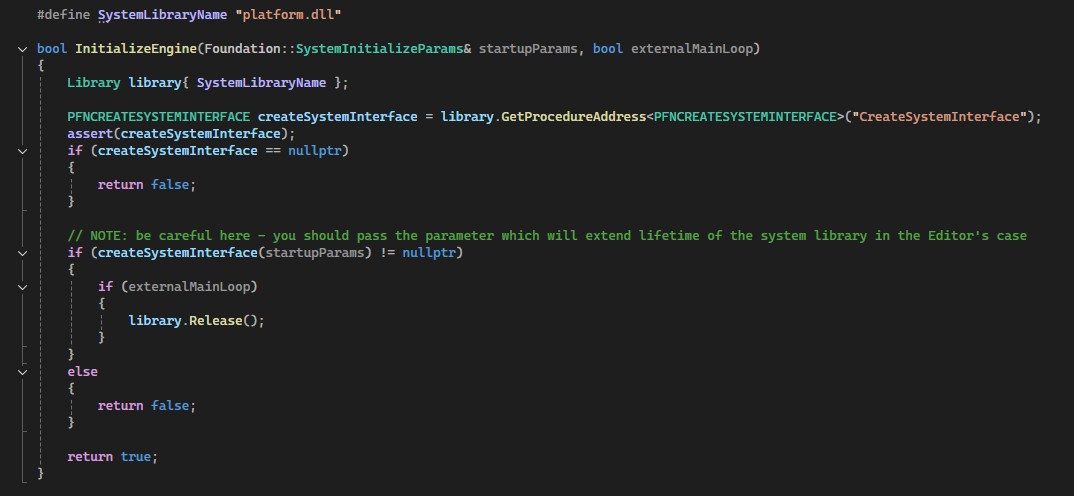
And with the good faith in the setup, we can call it. This call will create the PlatformSystem instance, which is the Foundation::ISystem implementation. The CryEngine saves it in the SystemInitializeParams struct, so it can be accessible outside. And now we are ready to load our other plugins.
Initialization
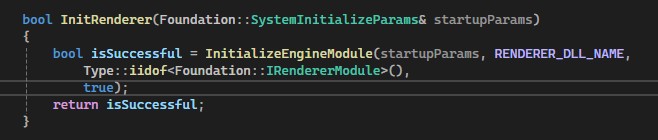
Now, we are in the platform.dll space, and we want to load our modules. The current example shows the loading of the renderer module.
But how can the code know about the modules we have? For this, CryEngine has a really interesting solution, it uses a lot of the quite interesting C++ features.
Let’s check how the renderer module is implemented: The renderer is a simple mock class, but we want to register it in the engine, so we can create it at runtime. For this, CryEngine provides the Foundation::IRendererModule interface and the Compositional Generators. So you don’t have to write a lot of the code, just add a few macroses (more details later) and override 2 methods - GetName() and Initialize(). All modules follow this interface.
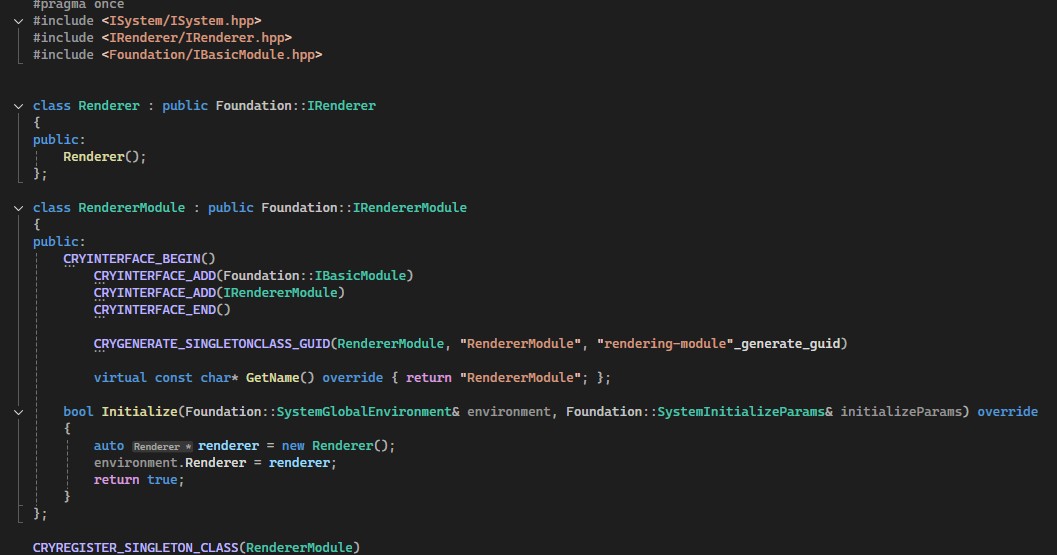
If you try to run the code right now, you will be surprised, because the code compiles, but you don’t have the Initialize call. And the issue is in the missed <Foundation/Module_impl.hpp> header. That’s the main implementation, you have to add this to the renderer.cpp file, or guarantee one entry. After this, we are able to use the module at runtime. The actual registration is skipped - I will come back to this at the end.
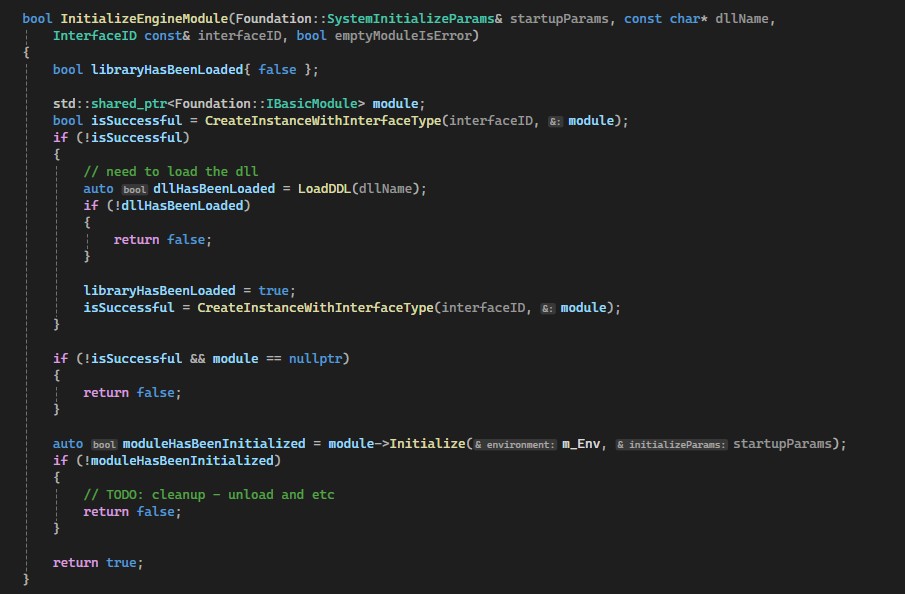
Let’s go back to the init - we have access to modules now. And we want to call the Initialize, for this, CryEngine provides the CreateInstanceWithInterfaceType implementation in the PlatformSystem. The basic logic is like this - try to find a factory, if not available, it would try to call the LoadDDL, and will try to CreateInstanceWithInterfaceType again. LoadDDL is nothing more than a similar implementation to the CreateSystemInterface. But it has a different function target name - ModuleInitISystem. This call will register everything we need to create the module, so the PlatformSystem can create it and call the Initialize from the Foundation::IBasicModule interface. Now you can check the source code - https://github.com/iHR4K/cryengine-plugins. I added 2 mock implementations of the IRenderer, so you can try to run the build - now the actual renderer that is going to be in use depends on the order you call the build (they have the same name “renderer” + be sure you click rebuild)
A little more details
And that’s basically it, now I will add some details I threw away, but not too much. Maybe with some feedback, this part will be updated - if you need some additional info, please write me on Twitter - https://x.com/iHR4K.
Why we should add that <Foundation/Module_impl.hpp> header? Because of the way CryEngine implements the factories registration, that’s to be clear, the amazing code. The great usage of the typelist and code generators, so be sure to check the code.
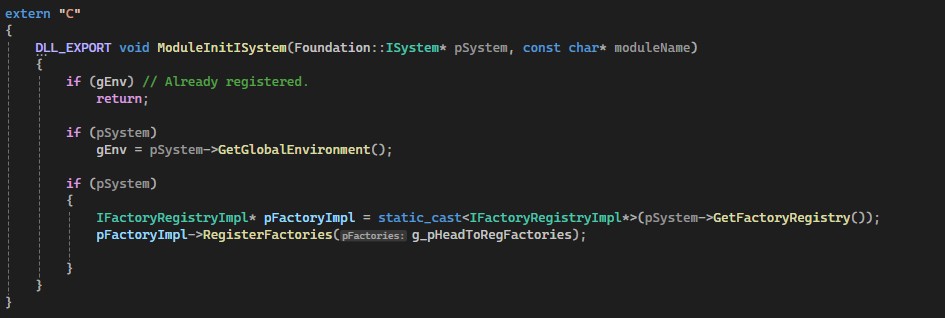
So the final point of registration is - in the ModuleInitISystem call, we want to pass static g_pHeadToRegFactories (populated by the code generator) to the RegisterFactories of the FactoryRegistryImpl. This class holds references to factories for the classes, and with the IterateFactories call, we can extract them for the CreateInstanceWithInterfaceType call in the PlatformSystem.
I know that’s a little hard to follow, but that’s how actual implementation works :) Once again, let me know if that’s hard to follow - I will add something here.
And how can we create the class instance, and why does it work for different ones? So, as you remember, the module interface is on the Foundation level. That means we have access to this everywhere. CryEngine registers the available classes with the code generation, so basically, GUID macros will add all available info to the class, so you don’t need to think about this. The GUID expects you to pass the interface name with _generate_guid user-defined literal. So we pass the hash of the name. Thanks to constexpr, it’s compile time(original code is much harder to follow). The whole idea is to inject the static InterfaceID const& IID() method.

So, one side is done. How can we use this to create the instance? That’s really simple, just because we registered the modules with the interface ID/GUID. IterateFactories call in the PlatformSystem will return all available ones. We ask the factory to create it and with typecast magic we can cast the raw pointer TypeCast::interface_cast
Final Words
Thank you for reading so far, I hope this was interesting for you :)
I personally really liked the code, and it’s a really good source of wisdom. I probably would add some more info about typelist and about generators, but later. Anyway, let me know how it goes.
Good luck